Last reviewed: August 2026
Step 1
Choose the calculation you want to run
At-a-Glance
- •Manual rules cover one deadline, or the gap between two dates
- •Sequential chains two or more stages you define
- •No Court calculation profiles are maintained for New Zealand
Start with the job you need doing, because that choice changes which controls appear underneath it.
Manual rules
Sequential
You bring the rule; the calculator applies it
Your legislation, contract, court rule or workplace policy is what fixes the start event, the period, the regional calendar, the year-end definition and the boundary wording. Settle those first, then set them here.
Manual rules
Run a manual deadline or date-difference calculation
At-a-Glance
- •Deadline when you have a start date and a period
- •Days between when you already have both dates
- •Set both boundary boxes from the wording of your source
Work down the form in the order it appears.
 Open full size
A three-day check worth doing
Start on Monday 2 February 2026 and enter 3 working days. Exclude the start and you get Thursday 5 February; include it and you get Wednesday 4 February. If your answer is one day out, this is usually why.
Not sure which date counts?
Regional holidays
Choose the regional anniversary calendar
At-a-Glance
- •Nationwide public holidays always apply; Regional anniversary days only add anniversaries
- •Leave Regional anniversary days empty when no regional anniversary applies
- •Choose from the rule you are applying, not from where you are sitting
Nationwide public holidays always come out in working-day mode. The Regional anniversary days control is only about whether one or more regional anniversary days come out as well, and it gives you three ways to answer that.
No regional anniversary days
One region
Several regions
Whichever you pick, Calculation details names the regions applied and Non-working dates lists every anniversary in the period. Worth a look before you rely on the date.
One region, one day of difference
Count one working day forward from Friday 23 January 2026 with the start excluded. No regional anniversary days gives you Monday 26 January. Auckland gives you Tuesday 27 January, because Auckland Anniversary Day comes out.
Location here is a legal question
Working-day exclusions
Select any additional date exclusions
At-a-Glance
- •Six fixed windows, three weeks apart end to end
- •Additional excluded periods do not change Regional anniversary days
Additional excluded periods appears for working-day calculations. Each selected window sits on top of the weekends, nationwide holidays and regional anniversaries already coming out. On the same inputs these definitions can land three weeks apart, so every selection must come from the governing document rather than from the date ranges alone.
 Open full size
Every window is inclusive of both its dates. Windows that look almost identical are not interchangeable, so check the version of the agreement, court rule or statute governing your deadline, including any amendments or special clauses.
Don't choose by date range alone
Specialist calculations
Set the ADLS, court or RMA exclusions
At-a-Glance
- •Use the year-end definition your governing source names
- •Choose the regional calendar as a separate decision
- •Keep pauses, extensions and case-specific directions out of the count
These are ordinary calculations that you control. Nothing here is inferred from your other selections, and changing one setting never quietly changes another. For a property deadline, take the year-end definition, the province and the boundary wording from the agreement itself. For a court deadline, use the High Court Rules working-day definition only where the procedural rule you are working under adopts that definition; no Court calculation profiles are maintained for New Zealand. For an RMA count, take the RMA year-end window and then choose Regional anniversary days as a separate step, because the RMA option does not switch the Regional anniversary days control for you.
Which leaves a fairly clean split of responsibilities:
Handled for you
Yours to settle
Yours to check
RMA and Regional anniversary days stay independent
Count seven working days from Friday 16 January 2026 with the start excluded and no regional anniversary days gives you Tuesday 27 January; Auckland gives you Wednesday 28 January. Pick the calendar your source calls for; nothing here will overrule it.
Follow a completed specialist setup
Topic
Build sequential
Set up and review each documented stage before running the combined calculation.
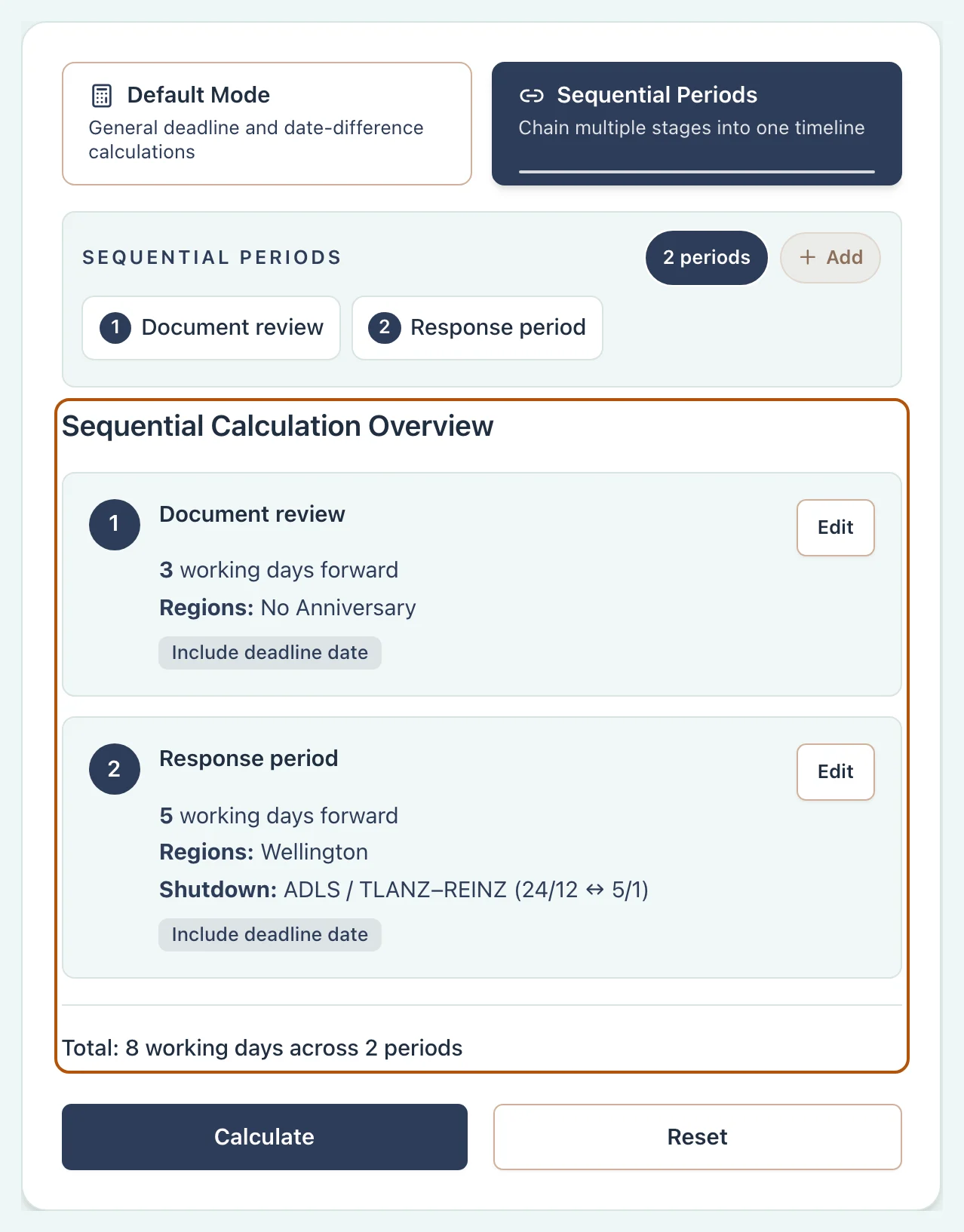
Before relying on the answer
Read and verify the result
At-a-Glance
- •The headline date is the start of the review, not the end
- •An exclusion you expected and cannot find means a setting is wrong
- •Resolve any warning before you export or share
Everything below the headline is there so you can see how the count was reached. Here is what each part of the panel is telling you.
 Open full size
- Headline
- The date, and whether it was counted or excluded. Check it answers the question you meant to ask.
- Calculation details
- The direction, counting method, boundaries, regions and other assumptions applied to the result.
- Timeline and calendar
- A visual check of the counted and excluded dates. In sequential work, each period remains identifiable.
- Non-working dates
- Weekends, public holidays, anniversary days and other exclusions. This is the row that explains a surprising answer.
- Warnings
- Coverage, data and configuration problems, which are worth resolving before you rely on the answer.
- Export to PDF
- The PDF keeps a record of what you ran, which is not the same as a second opinion on the governing rule.
Check the result against its source
Topic
Troubleshooting
Find the setting most likely to explain a one-day difference or missing exclusion.